Table Timing
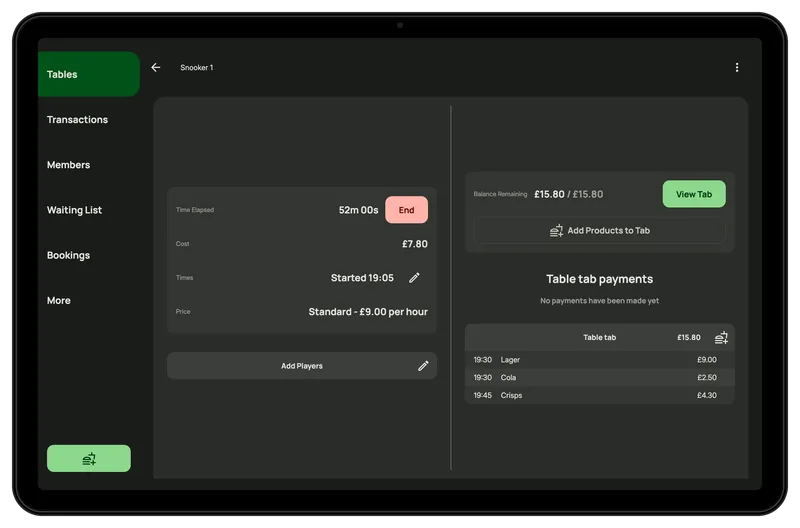
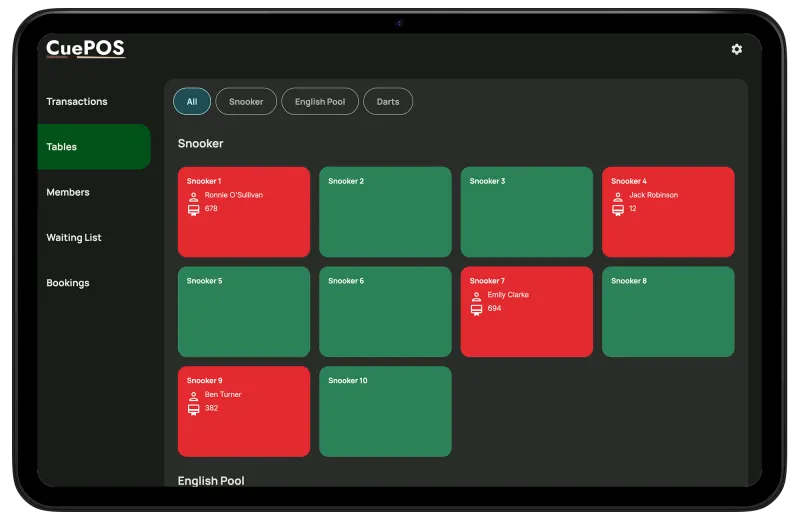
Every snooker and pool table on one screen, with the clock and the cost running on each. CuePOS works out the price, peak rates, minimums and offers included. Nobody needs to squint at a price list behind the bar.
Free tables show green and tables in use show red, with the player's name on each. Tap a table to see its session, the running cost and anything on the table's tab.
The cost goes up minute by minute as the table plays. Anyone asking how much they owe gets an answer straight away.
If a group has booked an hour, set an end time. If the table runs over, it's flagged as overdue so staff can have a word or let the clock keep going.
Put snooker tables, pool tables and dartboards into their own groups, each with its own prices.
You set the prices once. When a table starts, CuePOS picks the right rate for the day and time and applies any minimums, caps or offers you've set up.
Charge more on Friday and Saturday nights and less on weekday afternoons. The rate is chosen automatically when the table starts, and staff can still change it if they need to.
A minimum charge means a ten-minute knock still pays its way. A maximum keeps the all-day regulars happy.
Run deals like "every 60 minutes, get 15 free". CuePOS takes the free time off by itself. No mental arithmetic at the bar.
Groups move tables, spill onto a second one, and argue about who owes what. CuePOS copes with all of it.
If a better table comes free, move the group across. Their table tab moves with them, so everything stays on one bill.
A party spread across three tables can run them all on one table tab and pay once at the end.
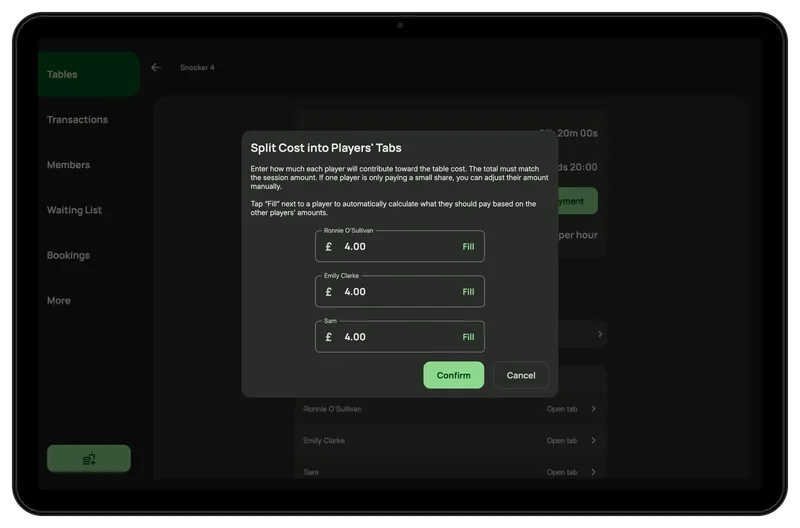
Divide the table cost across the players' own tabs. Change a share if someone only played a frame or two, then tap Fill and CuePOS puts whatever's left on another player.
Friday night, every table's busy and people are waiting at the bar. The trick is getting the next group on the moment a table frees up.
Customers waiting for a snooker table or a pool table go on the list in the order they arrived.
A badge shows staff as soon as someone waiting can go on a free table, and they can start them straight from the list.
If starting a walk-in would clash with a booking later on, the tables screen warns staff first. Read more about online table booking.
The back office shows how your tables are being used. Spot the quiet afternoons that could do with an offer, and the busy nights where you could charge a bit more.
See the hours played and the amount taken on each table. Handy when you're deciding which tables to recover, replace or price differently.
The back office dashboard shows how many of each table type are in use right now. You can check how busy the club is from your sofa.
FAQs
Yes. Set peak and off-peak rates by day and time, and CuePOS picks the right one when each table starts.
Yes. Snooker, pool and darts each have their own prices.
If you've set an end time, the table is flagged as overdue when it goes past it. The clock keeps running until staff end the table.
Yes. Split the cost across the players' tabs, tweak anyone's share, and they each pay their own tab.
Yes, with offline mode switched on (it's currently in beta). Staff can keep starting and ending tables, running tabs and taking cash. Card payments and bookings need a connection, and everything syncs back once you're online again.
Yes. You choose how often the cost goes up, from every minute to every hour. At an hour, a customer pays for a full hour even if they finish early.
Request a Demo
Tell us about your club and we'll show you round CuePOS, including hardware leasing if you're interested.